Showing posts with label Fuji XT-1. Show all posts

Wednesday, September 23, 2015

Fuji 56mm f/1.2 Lens Review

I would like to think I have a good grasp of what I want/need in my photography equipment.  I always talk about minimum things a lens or camera must have before I even consider purchasing it. In the past, I have bought several things based on hype or convincing YouTubers and felt burned after spending hard earned money on something that did not fit my needs. The Fuji X-T1 is one example that breaks every rule and standard I have. It does not have “fast” controls (relative to what I am used to), it does not have in-body image stabilization, it has a low flash synch speed and the AF is arguable the slowest out of all the mirrorless cameras I own. Yet, I find myself picking up the X-T1 more times than not. 

My first time using the X-T1 & 56mm Combination under controlled studio conditions. The results definitely exceed my standards
I know what you are thinking, why am I talking about the Fuji X-T1 when the title of this post clearly states it’s a review on the Fuji 56mm f/1.2. In my humble opinion. I feel the 56mm lens belongs to the X-T1 and this lens truly defines the system as a whole. While I have had some time with the venerable 23mm and 35mm glass, nothing has stunned me more than this seemingly perfect portrait lens. 

All RAW files, with the exception to the studio shots, were first converted to TIF files via Silky Pix and then edited further in Lightroom. 
Before I go any further, I must qualify this review by stating one glaring issue if you are a heavy user of Adobe photo editing products, particularly Lightroom. Simply put, I do not like how Lightroom converts Fuji Raw files. There are work arounds to this and is something I have considered and implore you consider if you decide to use this system with LR. You can read my thoughts about Raw converters below. Now that we have gotten that out of the way, let’s carry on with the review.

My Final Thoughts on Capture One Pro 8


Raw Converters: Lightroom vs. Capture One Pro

Auto Focus Speed and Accuracy:

There is not much to say about this lens besides the fact that it is the slowest focusing lens I own. It is safe to say that all Fuji glass I have tried is slower than any OMD or Sony A7II glass (though I must admit I only have the FE 55mm and FE 70-200mm lens) I own. It does have a tendency to hunt in less-than-ideal lighting conditions, but it is mostly accurate. I qualify the accuracy of the focusing because I believe this is mostly operator driven.  Because the focal plane is so thin at f/1.2 and at close distances, the slightest movement can shift the focus from the eye to the eye lash or even the nose. I do feel in-body image stabilization would help for portrait work. As a general rule of thumb, I try to keep my shutter speed faster than 1/100th and I fully depress the shutter release as opposed to half pressing, waiting for the focus confirmation and then pressing the shutter release all the way. These “shortcomings” are by no means a deal breaker. I simply adjust my shooting technique to accommodate the “nuances” of working with a Fuji system. 


Image Quality:

This is by far the most important factor in my opinion and is highly subjective. I try to stray away from speaking matter of fact about image quality since I have a hard time quantifying or measuring the beauty of an image. Speaking only for myself, I am in love with the output from the 56mm. The quality of the bokeh is smooth and does not detract from the image. I have seen other lenses produce distracting and busy out of focus areas, but the bokeh with this glass seems organic and is pleasing to my eyes. Once you run the Fuji files through a RAW Converter other than Lightroom, the files are wonderfully sharp and have a nice pop to them. This lens defines the system and belongs with every Fuji owner. I would go as far to say this should be the first lens you buy if you are a portrait photographer.  I can go on with the superlatives, but I'll leave you with sample photos instead.

RAW file edited in Lightroom. Note: this did not go through the Silky Pix software.
 I believe the only filter I used was the Classic Chrome Fuji setting.

Hands down my favorite shot taken from San Diego Comic Con 2015

Build Quality and Weight:

To me, I believe good weight and bad weight exists in all things whether you are talking cameras, cars, computers and so forth. Size and weight is something mirrorless users tout as an inherent benefit of using this platform and I wholeheartedly agree with this sentiment depending on the situation. If you like to hike and travel, every ounce start to feel like pounds after several hours trekking, so weight becomes an important factor. This lens, in my opinion, can be used for these applications, but is not what Fuji intended. More on that in the next section. A 1 pound (56mm = 0.89 lbs.)  lens on a 1 pound body (Fuji X-T1 = 0.97 lbs.) can feel a bit front heavy and unbalanced. The same can be said about most of Fuji’s new lens offerings. With that being said, the camera becomes more balanced and easier to handle with a vertical grip added. Although I don’t personally own one, I have handled the camera with one on and plan on adding it to my collection in the near future. 


Relative to my Olympus 45mm lens, this is heavy…and I like it a lot. Not only does it feel like a quality piece of glass, I find stabilizing the body easier. The additional weight can mask some poor shooting technique, of which I occasionally exhibit, especially when I push down the shutter release too quickly. Torquing or jerking a light weight camera is a prevalent issue with me so I welcome some heft. Overall, I am impressed with the build quality and believe the 56mm metal construction will last me a long time.   

Philosophy of Use:

I find that all of my cameras serve a very specific purpose and this lens is no exception. I think my Olympus OMD is the only camera I find that is my jack of all trades, master of none camera. While I believe you can get away with doing several types of work with this lens, my personal philosophy of use is portraiture work. I believe the AF speed on this lens precludes it from being a dedicated concert photography lens or an ideal tool for weddings, but it certainly can be done (and I have used it for both types of work). If I had to complain about anything, it would certainly be its focusing speed. Well, that and it has a fairly long minimum focusing distance of approximately 2.29 feet. For deliberate, controlled, portrait work with the Fuji platform, there isn’t a lens I can recommend more than the Fuji 56mm f/1.2. Without a doubt in my mind, this lens has made me a Fuji Fanboy and makes me excited to try/purchase other primes.   


Wednesday, July 15, 2015

Going to San Diego Comic Con with my Fuji X-T1 and Sony A7II

Taken Tuesday evening, the week of San Diego Comic Con.  It is always fun to see SDCC transform right in front of you. I have read articles indicating how important this event is to the local economy. Taken with the Fuji X-T1 and Tokina EL 28mm lens. 
For the past six years, I have exclusively taken a micro four thirds camera with me to Comic Con. It started with the Panasonic GF-1, then the Olympus OMD E-M5 and finally my favorite camera, the Olympus OMD E-M1. My confidence with the system grew and grew with each passing year and I never felt the need to bring any other system. These mirrorless cameras delivered on image quality, speed, usability and most importantly weight. I loved the fact I could walk around all day and never feel burdened by carrying more than 2 or 3 additional lenses. I wanted to change things up a bit this year and see what I could do with a different set up. The the only toll was on my body, as I had to significantly increase the weight of my backpack. Below is a list of all the gear used:

  • Kata KT DL-DR-466 Digital Rucksack (my favorite mirrorless backpack)
  • Manfrotto Tripod MK393-PD
  • Slik SBH-100 Tabletop Tripod
  • Sony Alpha A7II 
  • Sony FE 70-200mm f/4 G Lens
  • Sony Zeiss 55mm f/1.8 Lens
  • Fuji X-T1 - pre firmware 4.0
  • Fuji 56mm f/1.2
  • Zhong Yi Lens Turbo II m42 to Fuji X mount adapter
  • Tokina EL 28mm f/2.8 m42 lens
  • Zenit Helios 44M-4 58mm f/2 m42 lens (my Russian Wonder)
  • 2 Cheetah V850 flashes with triggers
The shallow depth of field really helps isolate this zombie cosplayer. Taken with the Sony Alpha A7II with the 55mm @ f/1.8
While this may seem like a lot of weight, I will assure you it was manageable and I did not carry it all at once. Our hotel room was close enough to the convention hall that I could leave the tripod and FE70-200mm lens in the room and pick it up if I knew I would be working the Gaslamp District. For the most part, I carried only primes with me as I knew I wanted to use a fast lens within the not-so-perfectly lit convention hall. The added benefit of using a fast lens with either an APSC or Full Frame sensor is the ability to separate your subject from the ever so busy background that is SDCC. While "too much bokeh" can get tiresome, I find that it really helps to accentuate the cosplayer I am trying to photograph. The crowds have in many of my shots ruined what is otherwise a pretty cool image.

A panorama taken straight from the A7II. The was really well received by the Killer Pumpkins crew. 
The patience of cosplayers is astounding. They will stand and pose for you without complaining even when guy-with-camera decides to take advantage of a situation and snap more than 20 shots (it happens).  While I can comment on the autofocus speed, I think it is not as important as autofocus accuracy. Being that they are both contrast detect platforms, it is safe to say they are both very accurate. However, I must say the Sony A7II seems to have that slight edge on the Fuji X-T1. I had a higher percentage of perfectly focused (on a subject's eyes) photographs with the A7II, but this was only a marginal difference. It is possible that I was using too slow of a shutterspeed with the X-T1.

Psylocke from the X-Men - Sony A7II with the 55mm wide open. 

That is the glaring difference I noted with the Fuji and Sony cameras. The Fuji could truly benefit from an in-body image stabilization system (IBIS). While I could get away with 1/80th with solid technique, I found most of my shots came out clearer at 1/125th or higher whenever I use the Fuji 56mm. IBIS would certainly help with those minor movements especially when shooting wide open. The slightest bump or shake could shift the focus from the eyes to say the eyebrows.  I was not only able to capture shots consistently  at 1/60th with the A7II and the Zeiss 55mm, but I was also able to keep my ISO down to about the 200-640 range. Speaking only for myself, my future camera purchases MUST have IBIS. Not to say the X-T1 is a bad camera, I just know what I want after shooting several cameras and in-body image stabilization is a feature I would rather not live without.

The world outside of the convention has a significantly different feel.  The characters and cosplayers alike seem to have a different and wild energy. Never a dull moment at the Gaslamp District - Taken with the Fuji X-T1 and the 56mm (Classic Chrome photo setting)
Ms. Sinister. I truly love it when the roles are reversed. Another image
taken with the Sony A7II and the Zeiss 55mm.
Before I come off sounding like a Fuji hater, I can't help but gush over their JPEG output. My dedicated travel laptop only has Lightroom 4, which cannot process A7II or X-T1 RAW files. I don't normally recommend processing JPEG files, I would however make an exception for Fuji's. Simply put they are great straight out of the camera especially with my favorite Classic Chrome photo setting.  In my last post, Concert Photography with the A7II, I talk about how mushy Sony files can look zoomed in. This is a huge plus for me when I have to post photos for Killer Pumpkins, the Company who brought me on board and is the reason why I have access to San Diego Comic Con every year. It is important for me to be able to provide photos that I am proud to present to third parties and you can bet I would rely on Fuji in a heart beat. 

Not really a cosplayer, but more my partner in crime. I am in love with the bokeh quality of the Fuji 56mm lens. 
Overall, I was very pleased with my experience and I have zero regret about bringing two different mirrorless systems.  In fact, this past experience continues to solidify my love for mirrorless cameras. The paradigm shift is becoming more and more evident. I would say that I saw a significant amount of mirrorless owners roaming around San Diego. Of course DSLRs remain supreme and dominates the camera population, but I saw more and more people donning the Sony A6000, a Fuji X-100 variant or various Olympus OMD models.  The following two posts will be photo essays showing my favorite shots from both my Fuji X-T1 and the Sony A7II. As always, thanks for stopping by. 

For images from the Sony Alpha A7II - CLICK HERE
For images from the Fuji X-T1 - CLICK HERE

Thursday, May 14, 2015

5 Day Black and White Challenge

Photography challenges can be a lot of fun and it most certainly can be an opportunity to get yourself out there to shoot. Some of my photography buddies recently challenged me to a five day Black and White project and I happily obliged. I haven't done a photo essay in a long time and just wanted to share my five favorite shots from the challenge. I made an attempt to really try something different. All of the following shots were taken with the Fuji X-T1 in RAW and converted in Silky Pix. 

As a side note, I have been really pleased with the output from Silky Pix. Although I find it not as sharp as Capture One Pro, it does a good enough job for me as a pure RAW converter. Of course you mileage may vary.  As always thanks for stopping by.

Meet one of my best friends, Jeff. This was taken at the dessert at high noon. I knew his hair and sunglasses would provide a lot of contrast so I decided to blow up the highlights. While I normally try to preserve the highlights, I opted to do just the opposite. This was taken with the Fuji 56mm
Macro was never my strength, so I decided to give it a shot on my second day. This miniature toy skateboard was found around my complex. Just one of the many lost toys I found. This particular shot was taken with the Super Takumar 50mm macro lens adapted on the Lens Turbo II Focal Reducer. 
Another lost toy I found in my neighborhood. If memory servers me right, this is an amber tone B&W conversion. I am really beginning to like this look and plan on using this process in future edits. This shot was taken with the Super Takumar 50mm macro lens adapted on the Lens Turbo II Focal Reducer. 
I received this all metal Wall-E statuette from my brother for Christmas. This has inspired me to take him with me as a part of my future photography project. The Takumar 50mm macro has been a stellar performer and I just wish I could get in just a little bit closer to my subjects, but I won't really complain about a $90  investment that is this sharp.
Obligatory muse post. The rendering of the Fuji 56mm f/1.2 lens is truly something else. Part of the reason why I have spent a lot of time with the X-T1 is this particular lens. While I think the 23mm is a spectacular lens, I think the 56mm is exceptionally good.
I know I mentioned this was a five day challenge, but I decided to throw one in from Heather's set. I have been really impressed with some of her work and this shot is no exception. I liked her use of framing within a frame and its overall ominous feel.

Friday, April 17, 2015

My final thoughts on Capture One Pro 8 and Fuji X-Trans Files

Note: I decided to use my photos from a recent trip to the Angeles Range at Lake View Terrace, California. This photo set demonstrates the amount of detail you are able to extract from a TIFF file once it has been converted from RAW. The range is set up so shooters are comfortably shaded under a long awning, while the targets are out in the open sun. Metering appropriately was extremely challenging, but you will see below that Fuji files have amazing dynamic range. All RAW files were imported into Capture One Pro 8, converted to TIFF files and imported to Lightroom for editing. Gear used: Fuji XT-1, Fuji 56mm f/1.2 and an adapted Olympus OM 24mm f/2.8

To see my previous post on Capture One Pro, click HERE

An HDR sample using three TIFF files (slightly over-cooked). Nik software was used to combine all exposures
I have spent a significant amount of time working with Capture One Pro 8 (C1P for short) and in my opinion is a far better raw converter than Lightroom 5 (LR5 for short), whether I am using Sony, Olympus, Panasonic and/or Fuji files. The files just seem to have more punch, detail and clarity - things that are extremely important to me when I deliver files to clients. While some may argue that C1P has a good starting point and that LR5 with some tweaking can get to where they want, my experience suggests otherwise. Pete Bridgewood offered some great sharpening tips for LR5 that has greatly improved Fuji Raw files, but not to the same extent as C1P to my eyes. I started to notice some artifacts in my out-of-focus areas but only at the pixel peeping levels. 

I ended up going to the range with the same co-worker who bought a Fuji X-T1 based on limited use with mine. Instead of using a dedicated scouting scope to determine where our shots land, we used the Fuji X-T1 with a terribly inexpensive Rokinon 500mm, fixed aperture mirror lens.  Optically it is nothing to write home about, but as a component for a "digital" scout scope, it worked perfectly. Due to the crop factor you get an effective field of view of 750mm. You can essentially double your range by using the magnify zoom feature. I would have never thought to do this and I'm glad he taught me another way to use my camera. 
This is a Remington 700 bolt action with an upgraded Arctic Stock. Very cool toy. For this particular shot, I did a middle of the ground metering - pretty much an average of the highlight and shadow regions. There is definitely a lot of room for recovery.

For this particular shot, I metered for the shadow areas (my co-worker). While it may seem like I had lost all of the blue in the sky, this particular time of day was overcast and gloomy. 

An hour into our range time, the clouds parted and the blue sky made an appearance. I decided to swap to my Olympus 24mm with an intent to get a little more context of the range. I metered for the hills with intent to recover the shadows. In my opinion, it did an admirable job. What do you think?
So the million dollar question: Will I transfer my post processing workflow over to C1P. The answer is unfortunately, no. Simply put, I couldn't get behind the user interface. The functionality was very backwards to me and I spent a good amount of time trying to navigate the controls.  While I liked some of the features such as the color correction wheel and color blending, I found it very lacking in the portrait touch up department. A good portion of my work is portrait photography and I fix minor blemishes very quickly and seamlessly in LR5. I find Adobe's algorithms for healing and cloning at the top of its class. I spent a good half hour trying to edit a client headshot and I could not effectively clean up the file to my standards. This ultimately made my decision for me. I primarily blame myself for not being proficient with this tool, but for what it's worth, I found the LR learning curve to be extremely low. 

This is an example of a shot where the lighting was ideal. Enough light was coming to the shooters right creating a balance, so to speak, of light. Uploading the Raw file directly to lightroom left me feeling unenthused due to the muddy details. I know I shouldn't pixel peep, but it's a way to benchmark my files. 
I added this only because I don't get many photos of myself, especially doing something cool as skeet shooting. 

Part of me feels I did not give C1P a fair shake, but I just couldn't "invest" the finite amount of time (and money) I have to a new program. What honestly put the nail in the coffin for me was Fuji's recent release of their own Raw Converter (using the Silky Pix platform). Although I find C1P far more sophisticated and "sharper", Fuji's software was good enough for my needs and more importantly it is free. I will follow up this post with more examples from Silky Pix. 

-Dino

Note: By converting your raw files to TIFF, I noticed I lost my ability to use the popular camera profiles Fuji is known for. I personally am a huge fan of the Classic Chrome profile and not being able to utilize it as a creative tool was a little disappointing. If anyone knows a work around for this, I would greatly appreciate the advice


Tuesday, February 3, 2015

Raw Converters - Lightroom versus Capture One Pro

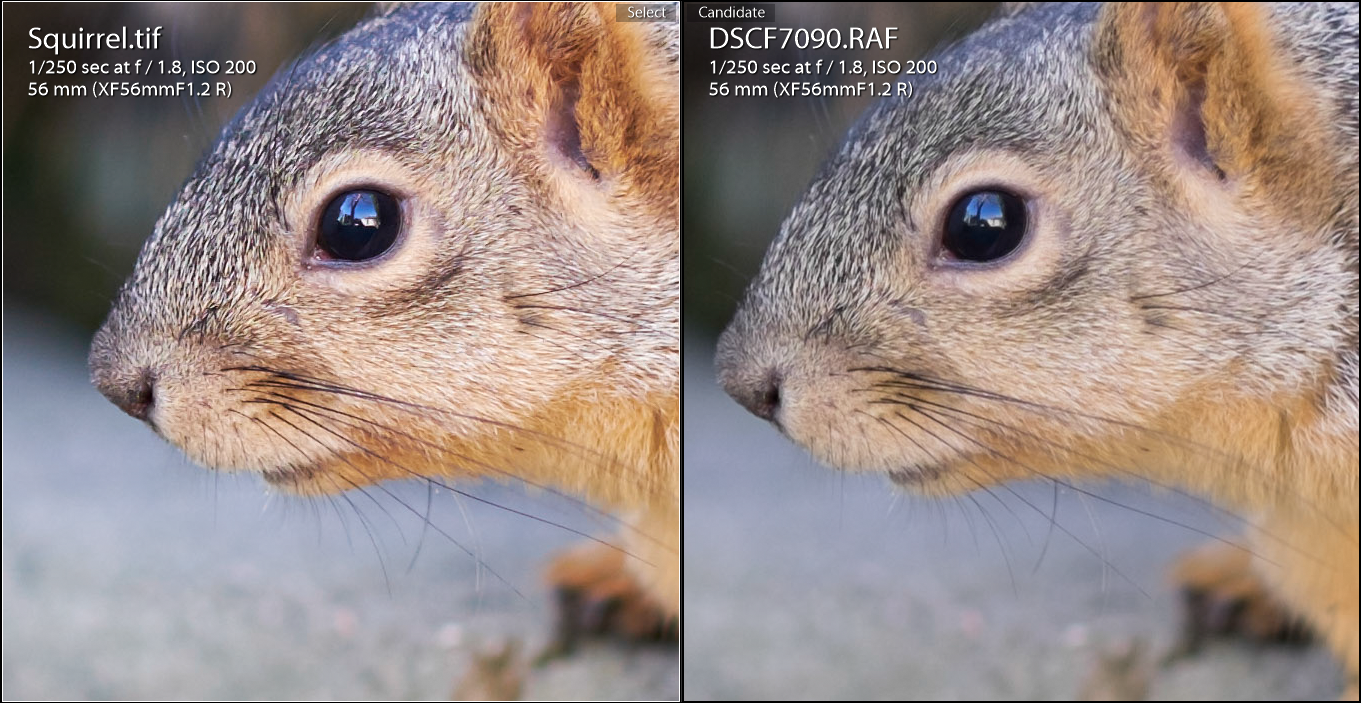
In my constantly evolving mission to see whether I should be a 3 system photographer, I venture into the RAW files produced by my Fuji X-T1. Before I turn this into another one of my reviews, I will say that when I first opened the raw files in Lightroom, I was taken aback by how smudgy some of the details look at 100%. I have heard reports about how Lightroom version 5.4 (and higher) has done a better job with their demosaicing of the Fuji X-Trans RAW files, but to my eyes it was just shy of being great.  Now don't get me wrong, I still like the files produced by the X-T1 paired with the 56mm f/1.2, but I want to be sure I get the most out of my files even if it means using a different RAW converter.

My initial search for a new converter led me to Iridient Developer. From what I have read online it is one of the best, if not the best converters for Fuji RAW files. The biggest problem - I don't own a Mac computer. ID would have been the perfect tool as it would have integrated with Lightroom seamlessly. As I continued my search, the name Capture One Pro (which I will  now refer to as C1P) kept popping up. I figured it wouldn't hurt to try it out since they offer a 30 day free trial. I am only days into my testing and immediately, I can tell you I have found a difference in the amount of detail and sharpness in my files. I generated a TIFF file from C1P and synced the image in Lightroom to do a one to one comparison. Exposure and color aside, it is pretty clear Capture One Pro is the winner - the screen grab will not do it justice.

Note: all of the screen grabs below have not been edited. All files are at their default setting. 

FujiFilm RAW X Trans File Comparison

RAW file converted in CP1 on the LEFT and RAW file converted in LR on the RIGHT.  Looking at the fur on the top of the squirrel's head it is clear C1P has far more contrast, clarity and detail. I initially thought I had misfocused, but upon viewing the file in C1P it was clear to me that LR was the "problem"
This immediately sparked my interest and made me consider the differences  in how LR converts my Sony and Olympus files. The results surprised me because I heard the root of the problem was how Adobe products dealt with this files produced by Fuji's unconventional sensor layout. I won't pretend to know coding and/or the demosaic process, but I could only imagine how the arrangement of the blue, red and green pixels could pose a problem. I found a very interesting blog post by ChromaSoft that goes into great detail about the topic if you want to read more about it (I can't comment on the accuracy of the article but it is compelling nonetheless). Otherwise, I will just provide samples from both Sony and Olympus RAW files. 


Traditional sensor layout vs. Fuji X-Trans

Sony Alpha A7 RAW File Comparison

RAW file converted in LR on the LEFT and RAW file converted in C1P on the RIGHT. Like the Fuji files, I noticed far more contrast and clarity with C1P's conversion. The eye shadow and pupil has a lot more punch and the fine details in the skin are more pronounced. Even the rendering of colors are slightly different. From a sharpness standpoint, Capture One Pro is the clear winner

Olympus OMD E-M1 RAW File Comparison

RAW file converted in C1P on the LEFT and RAW file converted in LR on the RIGHT. Given the results I have found with my Sony and Fuji X Trans files, it wasn't a surprise C1P brought out the most detail. In fact, I am inclined to bring down both the Clarity and Contrast sliders in touching up this particular headshot.
RAW file converted in LR on the LEFT and RAW file converted in C1P on the RIGHT. I decided to throw in clothing to show how both are rendered. 
Although I am only a few days into testing Capture One Pro, to me it's clear who has the better raw converter. However, in the next three weeks, I will see which software offers the best user experience. At the moment there are a lot of features I like, but there are other aspects that seem a bit backwards or counter intuitive to me. I'll chalk it up to growing pains for now. Expect a report about my one month trial period in the coming weeks. Only then can I truly say if I find the "upgrade" worth the price. Thanks for stopping by.  

Monday, January 12, 2015

My 2014 Mirrorless Journey with Panasonic, Olympus, Sony and Fuji

2014 was without a doubt a very fun year. I was fortunate enough to acquire different mirrorless cameras through trades, which my group of friends like to call "Trade Up Tuesdays", and a bit of luck with great used deals. Although I have been a fan of mirrorless cameras since the beginning, I will be the first to admit that they do not come without limitations. Several times during the year, friends have come to me for camera buying advice. While I am inclined to recommend a m43 camera or some of the newer Sony Alpha crop sensor bodies, I always ask what their budget and their intended use is. If anyone tells me they want to eventually shoot sports, weddings/events or wildlife on a full time basis, then I can't help but recommend a DSLR from Canon or Nikon. For anything else, whether it be street, travel or portraiture work I'm betting my money on mirrorless cameras. 

You might be wondering why I love these mirrorless cameras so much and it really boils down to 4 simple aspects:
  1. Weight - these cameras are so light weight, you won't mind bringing them anywhere. Even with an additional battery grip and the heaviest lens, these things are feathers compared to their DSLR "equivalent"
  2. The EVF (Electronic View Finder) - some love it and some hate it.  As for me, I simply can't live without it. I would rather see what the sensor is picking up rather than looking through the lens. 
  3. Adapting Vintage/Manual Focus Only Glass -  I have held the opinion since using the Panasonic GF-1 that mirrorless cameras offer the best user experience for adapting old and new manual lenses. From focus peaking to the fine focusing aids, these cameras have brought new life to what I believe was a niche photographic tool.
  4. Autofocus Accuracy - because the AF system is sensor based, you don't need to worry about back/front focusing or fine tuning each lens, especially fast primes, by doing micro adjustments. It goes without saying that the continuous AF has a long ways to go (I rarely ever use this except for video), but the single AF can be incredibly fast and incredibly accurate.
While most higher end DSLRs are fully capable of covering all types of photographic genres, I personally don't find them enjoyable to use (your mileage will most definitely vary). As for me, I can't live without the aforementioned perks and use each of my mirrorless gear for varying situations. Instead of trying to convince you how these are better or worse than their mirrored brethren, I decided to go the Zack Arias route and explain how each fit in my workflow.  

Olympus OMD E-M1

The Olympus OMD is my main workhorse. On many occasions I have been asked which out of all my cameras I would keep if I could only choose one and my answer is always the OMD E-M1. While it does not have the highest image quality, it does so many things perfectly in my eyes and has the highest usability factor.

Favorite Len(s): Olympus 75mm f/1.8, Olympus 12-40mm Pro f/2.8, Panasonic 7-14mm f/4

Intended Use: Events, Studio Portraits & Headshots, Product Photography, Concert

Favorite Features: The E-M1 has the best single AF out of all the cameras I have used. This camera can lock focus with ease in low light and is the primary reason why this is my preferred camera for events. The face detect is extremely quick/accurate and is the most used feature whenever I do headshots. The high flash sync of 1/320 is incredibly handy if you want to over power ambient light. Ergonomically speaking, the E-M1 in my opinion is one of the best, if not the best, I have ever used. The touch to focus and/or shutter release was perfectly implemented and useful when handing the camera over to others. Need I mention the in body image stabilization and the new tethered shooting function. There's just so much to like about the E-M1 and I have gushed over this camera over several posts. 

Olympus Pen E-P5

The Olympus Pen E-P5 was in my gear bag for a little under 6 months. I originally purchased the camera as a back up/secondary body to the OMD. It shared a lot of similar features to the E-M1 like the two control dials, the flash sync speed of 1/320 and 5 axis in-body image stabilization. If there was one thing I think Olympus dropped the ball on it would have to be the fact they did not integrate a rangefinder style EVF. Speaking strictly for myself, I would have sacrificed the pop-up flash for the view finder. Although the E-P5 was traded in to acquire the A7, I remember really enjoying it.

Favorite Len(s): Olympus 45mm f/1.8, Panasonic Leica 25mm f/1.4, Panasonic 20mm f/1.7

Area of work: Secondary body for Events and Travel   

Favorite Features: In many ways the E-P5 is just like the OMD in a smaller package, so I won't repeat myself. I wouldn't use the E-P5 as a my primary body, but as a travel companion it takes the prize. The form factor, size and weight are the selling points for me.

Panasonic Lumix GX1

The Panasonic GX1 is a relatively old micro four thirds camera that I acquired through Trade Up Tuesday =). It's interesting to note that this camera sold for a premium when it was announced (I recall approximately $800 - $1,000) and I was able to acquire this body by trading an old, legacy Olympus lens. Not bad if you ask me. This camera is just a breeze to use and is one of my fiancée's favorite cameras to use. Full disclosure, I haven't had much field time with this camera so it's hard to speak to both its strengths and weaknesses. 

Favorite Len(s): Sigma 30mm f/2.8*

Intended Use: Travel and fiancée's camera

Favorite Features: Based purely on aesthetics, I love how tiny and pocket-able the body is especially when you pair it with the Panasonic 14mm prime lens. *During our trip to Disneyworld, the GX1 and the Sigma 30mm f/2.8 lens were permanently around Heather's neck and the only lens we've used. Both the E-P5 and the E-M1 will surpass it in features and can easily run circles around this camera, but Heather seems to like the snappy single AF, the intuitive menus and the user friendly operation. If you are on a tight budget and want a good introduction to micro four thirds cameras, you really can't beat the GX1 with its going rate of ~$120 used on Ebay. However, if you are like me and need an electronic view finder, I'd say save up a little more and get the recently discontinued GX7.

Sony Alpha A7

The Sony Alpha A7. The first mirrorless, automatic AF, full frame camera that really shook up the photography world. Quite frankly, Sony is growing to be one of my favorite companies because they are truly willing to take risks. The A7 series, in my eyes, was a shot across the bow of Canon and Nikon's ship. It's not a perfect camera and I'll be the first to criticize it for its weaknesses, but boy does it scream innovation. This was the first camera marketed as an "open source" system, in which its greatest strength is that it can adapt almost any legacy glass. Some may argue this was a ploy to divert attention from the fact it has a limited number of native lenses, but speaking only for myself it has brought new life to my arsenal of vintage gear and I believe has made most of them viable creative and professional tools.

Favorite Len(s): Zeiss FE 55mm f/1.8, FE 70-200mm f/4 G, Olympus OM 24mm f/2.8, Olympus OM 50mm f/1.4 and the Takumar M42 mount 105mm f/2.8

Intended Use: Product photography, on-location portrait and engagement work.

Favorite Features: Out of all my mirrorless cameras, I find the Sony A7 does the best job resolving images with adapted legacy glass. I no longer have to think about the crop factor or depth of field equivalence. A 50mm is a 50mm and f/1.4 is f/1.4. By virtue of having a full frame sensor, I enjoy having that shallower depth of field which I find is something my engagement and portrait clients seem to prefer. Comparatively, I find the RAW files have richer colors and far more latitude to recover details from shadows and highlights. I am not surprised it is clinically sharp given its high ranking on DxO's website (11th best sensor to date).

From an ergonomic standpoint, I am rather fond of the A7 body. Sony's design team evidently created it to be used with the EVF in placing its shutter above the body as opposed to forward the body like the E-M1. Try composing with the back of the screen and you'll find your wrist contorting in a strange fashion to actuate the shutter. But bring it to your eye, it all starts to feel right in my book. Like the E-M1, I customized the A7 so that I can change the ISO, shutter speed, aperture and focus points without taking my eye away from the view finder. This is a huge plus and in some ways slightly better implemented than my venerable OMD with the scroll wheel assigned to ISO. The battery grip is also a welcomed addition when mounting heavier lenses. While the E-M1 has a better feel, I much prefer having two batteries in the vertical grip as opposed to having a battery in both the body and grip. The design feels far more secure and doesn't wiggle like the Olympus HLD-7.

Overall, it's a good first generation full-frame mirrorless camera with a lot of room to improve. The implementation of the in-body 5 axis image stabilization and auto focus improvements in the A7 mark II is an exciting move in the right direction. 

Fujifilm X-T1


The Fuji X-T1 is a conundrum to me. In many ways it falls perfectly in the middle of the micro four thirds cameras and the Sony Alpha A7. The APSC sensor is larger than my OMD but smaller than the A7. The auto focus in both low and decent light will lock on noticeably faster than Sony's full frame camera, but will not hold a candle to the E-M1. In other ways, the X-T1 offers a far different photographic experience with its retro-modern design that I find difficulty articulating why I enjoy using. This camera ranks incredibly low on the "Need" scale, but quickly shoots up the "Want" and "Fun-to-use" ladder. 

Favorite Len(s): FujiFilm 56mm f/1.2, Olympus OM 50mm f/1.4 and the Voigtlander 40mm f/1.4

Intended Use: I am still trying to figure out my intended use for having the X-T1, but it is fully capable of doing Product Photography, Portraits, Headshots and possibly Events. With the 56mm lens, it fills my need for an 85mm equivalent prime. 

Favorite Features: I joined the Fuji camp in November with only two manual lens adapters in my gear bag, the Olympus OM and the Fuji M mount. There aren't enough superlatives in the dictionary to express how fun it was to use manual lenses on this camera. The EVF size/quality and focus aids are simply incredible and are the contributing factors for my raving opinion. Nothing could improve the experience more besides having in body image stabilization but I suspect Fuji will be joining the party soon enough.

Shortly after purchasing the camera for an incredible price, I found out Fuji would be releasing firmware 3.0 which was touted to be ground breaking and it is. It's difficult to compare the X-T1 with pre 3.0 firmware and post 3.0 because I acquired a native lens for it late in December. With that being said, there are a lot of standout improvements had they not fixed would have driven me mad like the face detect feature. I have read reports that you cannot move focus points if face detect is on - that's just silly and I'm glad it's done away with. However, the real stand out feature for me would have to be the complete silent mode. Being able to take photographs without making an audible sound would have been instrumental during my studio shoot at Chapman University for the final taping of We're Alive. I was told not to take pictures during the actual recording as the mics were sensitive enough to pick up the sound of the shutter. I would have loved taking shots of the actors emoting and really getting into character. Fuji's 56mm f/1.2 lens, while not necessarily loud, makes enough noise auto focusing that it would not have been useful but I always have the option to manually focus or adapt. 

From the small amount of time I have had with the body, I am honestly very happy with the experience. Although part of me feels like I am still in the honeymoon stage of the relationship, I am confident my opinion will not change much. Time will certainly tell. 

Conclusion

Having been with in the mirrorless world since the Panasanic GF-1, I have seen these cameras evolve dramatically. They are no longer relegated to the my back-up or travel camera status. Whether you are Sony, Olympus, Panasonic, Fuji or even Samsung, these companies are producing photographic equipment that are viable professional tools. The DSLR is not dead or anywhere near their deathbed. Canon and Nikon will be the king of the hill for the foreseeable future but even they are aware there is a growing paradigm shift. It would behoove them to adapt, expand or think about ways they join the mirrorless camp before their competition pulls too far away from them. Consumers and professionals alike are seeing the benefits of smaller cameras but some are still clutching to their DSLRs for very good reason. A lot of these emerging companies have been addressing their system limitations, including some of my personal gripes, namely first party support. Hopefully 2015 will be the year where we see partial or full professional support for the working mirrorless photographer. For now I am just excited to see the growth and proliferation of really neat technology. It is an exciting time to be a photographer.

So say we all,
Dino

PS - the blog title is a little wink to one of my new favorite websites dedicated to mirrorless cameras. Give Eric Cote a hello over at www.mirrorlessjourney.com

Thursday, December 18, 2014

Fuji X-T1 - Firmware Update 3.0 - Update Tip "New Firmware Not Be Found"

Like many Fuji X-T1 owners, I was very excited to hear that Firmware 3.0 released today. The laundry list of improvements to their flagship camera is truly impressive, but what impresses me more is that they released updates to their older model cameras like the X-Pro 1 which was released in 2012. It's refreshing to see a company not abandon their older line - something Sony should think about especially with their Sony A-Mount cameras. Now more than ever am I itching to pick up a native lens for what seems like a brand new camera to me. 

Upon downloading the firmware file, I noticed I ran into a problem with the upgrading process. I got the message "New Firmware Not Be Found. Turn Off The Camera." I downloaded the files multiple times and even triple checked that I was pulling from the right link. According to Fuji, I need to make sure I upload the firmware file onto a formatted memory card which I did 3 times over.


I read from the Fuji site and saw that firmware 3.0 is named "FWUP0005.DAT". My computer however was downloading the file under the file name "FWUP0005 (1).DAT". To avoid the aforementioned problem, simply rename the file and delete any suffix after the 5 and upload to the memory card.  This fixed my problem and I was able to update my firmware without a hitch. I have read elsewhere that sometimes the files comes with a prefix so be sure to upload the file with this exact file name - FWUP0005.DAT

Update: It has come to my attention from a colorful viewer, who has recently been moderated, that the suffix issue is a user generated error. While my download history seems to tell me otherwise, I will keep this tip live as I find more utility in identifying a problem and offering a solution, than determining whether or not this was caused by human error.   

I don't know about you but I can't wait to try out all the new upgrades especially the new feature to print directly to the Fuji SP-1 printer.  Just in case you didn't know, here are all the updates as summarized by Dpreview.

  1. AF (Auto Focus) Area direct selection – Users can select the focus area with the 4-way controller, without pressing the Fn Button.
  2. Function replacement for the AE-L/AF-L buttons – The currently locked AE-L/AF-L button function will now be interchangeable, depending on the user’s preference.
  3. Focus Area size variability during MF (Manual Focus) – Users will be able to change the focus area in Manual mode during One Push AF with the AF-L button.
  4. Macro Mode direct selection – Users will be able to directly turn ON or OFF the Macro function in Auto Focus mode to expand the distance measurement range to the short-distance range. This will be possible without accessing the pop-up menu screen.
  5. Q Menu customization – The update will render the items and layout of the Q Menu, used for quick access of frequently-used items, changeable to the user’s preference.
  6. Video frame rate selection – In addition to the existing 60fps and 30fps selections, 50fps and 25fps, as well as a 24fps selection will become available to users. 50fps and 25fps allow video editing in the PAL region, such as Europe and elsewhere, without converting the frame rate. The 24fps will offer movie-like video capture and play back.
  7. Video manual shooting – Users will be able to select ISO sensitivity prior to shooting videos, as well as adjusting the aperture and shutter speed during video shooting.
  8. Phase Detection AF support for One Push AF – With One Push AF, operated by pressing the AF-L button during manual focusing, the update will enable Phase Detection AF with quicker focusing speeds.
  9. Metering area focus area interlocking – The update will enable users to interlock the AF area position with the metering area when spot metering is selected.
  10. Expansion of the Program Shift setting area – The update will enable the current Program Shift, in which the low-speed side is 1/4 second, to be shifted to a maximum of 4 seconds.
  11. Electronic Shutter – Adds electronic shutter function to original X-T1 Black bodies with a maximum shutter speed of 1/32000 second.
  12. New “Classic Chrome” Film Simulation – Film simulation that delivers muted tones and deep color reproduction.
  13. Support for INSTAX Share Printer – Photos can be sent directly to the INSTAX Share Printer for instant prints.
  14. Lock Function – Users can lock the camera to prevent unexpected dial and button operations.
  15. AF+MF Setting – Users can half press the shutter to autofocus, and then make fine adjustments using the manual focus ring.
  16. Three Custom White Balance options – Expands number of white balance users can store.
  17. Expanded EVF/LCD display types in Manual Exposure Mode – Users can now customize the way the image is displayed on the EVF or LCD.
  18. LCD Brightness and EVF/LCD Adjustment Control – Users can customize display brightness based on environment.
  19. Flash Compensation in Fn Button Setting – Users can now add Flash Compensation to any of the six custom function buttons.

Happy Upgrading,
Dino